


Datavideo SHOWCAST 100 Live Stream Switcher
Price and lead time confirmed on your quote
We reply personally on WhatsApp, 10 am–7 pm IST, Mon–Sat
Best for
- Live streamingAnything going out live — switcher, encoder, capture card, PTZ and monitoring.
- Church and worshipHouse-of-worship AV: PTZ cameras, a switcher, wireless mics, intercom and a stream out.
- Event and conference captureStage and hall work — long-throw mics, wireless video, tripods and a switcher at the back.
- Broadcast and newsStation and OB workflows: SDI infrastructure, intercom, encoders, reference and timecode.
- Corporate and trainingTestimonials, all-hands and internal training: neutral lighting, discreet lavs, reliable streams.
Overview
Product description from Datavideo
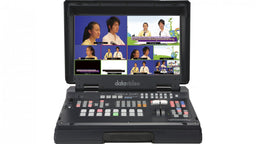
The SHOWCAST 100 is a brand new 4K 4-Channel All-in-one Productio Studio that features 7 major functions. It can switch video, overlay text and graphics, control cameras, live stream, record, and mix audio all from a single unit. Similar to a tablet, the 14-inch touch panel allows easy and intuitive access to switcher functions.
4K HDMI connections for inputs and outputs for connecting to a 4K projector or an IMAG screen. RJ45 connections for controlling up to 3 PTZ cameras via serial protocol.
More about this product
The touch panel allows easy and intuitive access to a variety of switcher functions. The SHOWCAST 100 has many functions with easy setup.
The unique all-in-one design streamline your video production workflow by reducing the number of external devices that you need to connect. SHOWCAST100 is light and compact. Its mobility makes it ideal for any live production environment.
The four HDMI input/output channels are designed for basic video production workflow of meetings, corporate conferences, church events, etc.
The SHOWCAST 100 offers two ways to overlay subtitles. A lumakeyed subtitle is usually used for logos, animated texts, etc. Another way is to overlay subtitles using the built-in network streaming encoder.
The SHOWCAST 100's built-in camera control functions allow you to simultaneously control three PTZ cameras. You can directly save the lens position presets, pan and tilt camera lens in real time, zoom in and out of an image, and adjust the white balance, iris and mirror mode.
The built-in dual live streaming encoder allows you to record and stream simultaneously. With the SHOWCAST 100's recording capability, you can easily back up the recorded video files for post production edits without much effort.
Gain immediate access to the auto tracking feature using a range of external controllers.
Beyond traditional camera controls, activating auto tracking on SHOWCAST 100 is also straightforward and convenient.
The integrated PID algorithm is able to detect the movement speed of the identified object and automatically adjust the camera's corresponding pan, tilt and zoom speeds in such a way that the lens movement will be smooth, avoiding common camera lens movement problems like jerky movements or unpredicted halts.
The positioning of talent depends on the videographer’s creativity and intent rather than strict rules. Different positions can convey various emotions, messages, or visual effects. A centered composition provides a sense of stability and balance, suitable for scenes that require highlighting the main subject. Videographers may also place the talent on the left third or right third of the frame, leaving adequate space in the foreground to showcase the talent’s sight direction or potential future possibilities.
All Datavideo PTC Camera with AutoTracking include the RMC-1AT controller. User can quickly select full-body , half-body and close up framing, making it easy to change the shooting scene and framing requirements.
If you are filming multiple people, you can designate a person for Auto tracking. Once linked to the camera, only the designated person will be tracked, avoiding interferences such as the desks, people coming back and forth, large objects, etc.
Virtual buttons on the large touch screen panel makes it easy for operating the switcher as well as setting up presets for cameras.
Operating the SHOWCAST 100 is as easy as using a tablet. Produce professional video productions without having a huge learning curve on how to use and operate a switcher.
Cut, Mix and Wipe are the three useful and simple transition effects built into the switcher. Via an easy-to-use 14 inch touchscreen UI, the transition settings will be immediately accessible after selection of a particular effect. For example, if you've selected WIPE, you can easily adjust the transition speed by dragging a slider with your finger or tap to select a color for the border.
PIP is often required in video production. Most of the time, the PIP window size need to be adjusted for the program view. The SHOWCAST 100 allows you to drag different sliders on the touchscreen UI with your finger to set the aspect ratio of the PIP window. The split window is usually used for live interview, corporate presentations, and panel discussions.
The SHOWCAST 100's built-in camera control functions allow you to simultaneously control three PTZ cameras. You can directly save the lens position presets, pan and tilt positions in real time and zoom in and out of a shot. In addition, you can adjust the white balance, iris and mirror mode of each camera.
Even though SHOWCAST 100 can control only three PTZ cameras, you can save up to four presets per camera, giving you a total of 12 different angles for your production. The 12 memory presets allow the director to instantaneously switch between different camera angles on SHOWCAST 100 by pushing corresponding preset buttons.
On the intuitive touchscreen UI, you can easily adjust the camera's focus, iris and white balance settings. Settings of a particular program can be saved in memory presets for future use.
The SHOWCAST 100 offers two ways to overlay subtitles. A lumakeyed subtitle is usually used for logos, animated texts, etc. Lumakeyed subtitles can be previewed on the multiview screen and transitioned to program.
Another way is to overlay the subtitles using the built-in network streaming encoder. On the web UI of the streaming encoder, enter the subtitle texts in the text field of the CG page after which the subtitle will be shown on your streamed video as streaming starts and recorded on the SD card along with the video. If lumkeyed subtitle and CG texts are shown at the same time, they will all be recorded on the SD card.
Luma key is an image processing technique that deals with the brightness level of an image or a video, thereby generating a foreground subtitle or logo. SHOWCAST 100's luma key function is designed for logos, text and animated images.
The CG texts or image generated using the network streaming server can be overlaid on the video during streaming. The text size and color can be customized with a border added. The text or image position can also be adjusted accordingly.
Transcribe audio by entering subtitles line by line using News CG then play subtitles in real time by simply tapping the space bar on the keyboard.
Highlight the information that you wish to convey to your audience. You can also transcribe audio by entering subtitles line by line using News CG after which you will be able to play subtitles in real time by simply tapping the space bar on the keyboard controller.
Depending on the bandwidth, you can set the bitrate to low, medium or high. To meet growing demand for mobile viewing, the portrait view can now be easily activated on the SHOWCAST 100 by simply pressing the VERTICAL button so that viewers will be able to view the program on their mobile devices by holding them upright without having to change the orientation.
During video production, you can simultaneously stream to two live streaming platforms such as Facebook, Youtube and Twitch. With Datavideo dvCloud, you can stream to 25 live streaming platforms at the same time and automatically back up your video files on the cloud server.
dvCloud is a professional live streaming platform developed by Datavideo. Once you've login, you will be allowed to create and manage all video streaming channels on dvCloud and stream your video to 25 live stream servers without any time constraints. The best part about dvCloud is that it allows you to back up video files on the cloud server for future downloads. The SHOWCAST 100 forms a low latency, secure and reliable streaming work flow with the SRT protocol and the dvCloud server.
In the box
- Showcast 100 product 1 x AD Switch DC 12V with AC Cord
Complete the kit
 On request
Datavideo HC-850S
Compare with similar
|
This product
 Datavideo SHOWCAST 100 Live Stream Switcher Price on request
| ||||
|---|---|---|---|---|
| Power | DC 12V 82W | DC 12V, 29W | DC 12V, 5A | DC 56V, 4.46A |
| Weight | 5.4 kg | 1.9 kg | 16.3 lbs | 9.2 kg |
| Picture in picture | 1 | 1 | 1 | 2 |
| Down-converted output | Yes | —Not listed | —Not listed | —Not listed |


Full specifications
| Model Number | SHOWCAST 100 |
|---|---|
| Video Standard | 4K & HD |
| Video Format | Input: 3840x2160p: 60/59.94/50/30/29.97/25/24/23.98 1080p: 60/59.94/50/30/29.97/25/24/23.98 VGA, XGA (1024 x 768), SXGA (1280 x 1024), UXGA (1600 x1200), WUXGA (1920 x 1200) Output: 3840x2160p: 60/59.94/50/30/29.97/25/24/23.98 1080p: 60/59.94/50/30/29.97/25/24/23.98 720p: 60/59.94/50 |
| Video Processing | 4K60 YUV4:4:4 8bit, YUV 4:2:2 8/10bit, YUV 4:2:0 8bit, RGB 4:4:4 8bit 4K30 YUV4:4:4 8/10/12bit, YUV 4:2:2 8/10/12bit, YUV 4:2:0 8bit, RGB 4:4:4 8/10/12bit HD YUV4:4:4 8/10/12bit, YUV 4:2:2 8/10/12bit, RGB 4:4:4 8/10/12bit |
| Input Routable / Crosspoint | N/A |
| Video Input | 4 x HDMI 2.0 |
| Mix HD & SD Source | ---- |
| Computer Graphic Interface | 4 via HDMI |
| Video Output | 3 x HDMI 2.0 for PGM 1 x HDMI for CG Preview |
| Down-converted Output | Yes |
| Built-in Multi-view Monitoring Out | On 14" Touch Panel |
| Analogue Audio Input | 2 x 3 Pin XLR / 1/4” (6.3mm) Combo Socket 1 x Stereo RCA set (L/R) Audio Input Switch: Stereo / Mono |
| Analogue Audio Output | 1 x Stereo RCA set (L/R) 1 x Stereo headphone (Mini Jack with volume control) |
| Digital Embedded Audio Support | Input 2 channels, Output 2 channels |
| Audio Delay Calibration | Up to 200ms |
| A+V Switching | Yes |
| Chromakey | ---- |
| Title Creator | Web GUI |
| USK | Lumakey |
| DSK | ---- |
| Picture in Picture | 1 |
| Logo Insertion | ---- |
| Still Store | ---- |
|---|---|
| Effects | Seamless Cut, WIPE, Mix |
| Transition Preview | ---- |
| Sync / Reference In/Out | Built-in Genlock (internal) |
| Tally Output | D-Sub -15 Male connector |
| PC Remote Control | Web browser UI for configuration and control Socket commands |
| Camera Control | DVIP/ RS-422/ RS-232 |
| Built-in Audio Mixer | Yes |
| Storage | 1 x SD Card Slot Supports SD, SDHC and SDXC card (UHS-I) (Class 10 above) |
| Recording File System | FAT, NTFS, exFAT |
| Recording File Format | MP4 |
| Video Encode | H.264 / AVC, Main/ High Profile Record Only: Up to 16Mbps (1080p 50/60) Stream Only: Up to 10Mbps (1080p 50/60) Rec and Stream: Up to 10Mbps (1080p 25/30) Rec and Stream: Up to 36Mbps (1080p50/60), Dual Stream |
| Audio Encode | AAC-LC Configurable bit rate range from 32Kbps to 384Kbps Sample rate: 48KHz, 16bit |
| Streaming Protocol | TS over TCP/UDP (unicast & multicast) RTSP over HTTP/TCP/UDP (RTSP Elementary Streaming) RTMP (Publish) |
| Firmware Update | USB |
| Special Features | 14.0" Touchscreen Display |
| Chassis | Unibody |
| Dimension (LxWxH) | 437.6 x 330.5 x 96.5mm |
| Weight | 5.4 Kg |
| Power | DC 12V 82W |
| Operating Temp. Range | 0~40 °C |
Manuals & downloads
- Brochure Use AI 4K Tracking Cameras to Enhance Production Value — Brochure PDF
- Brochure A Guide to Single Operator Video Production PDF
- Spec sheet SHOWCAST 100 Datasheet PDF
- Brochure ShowCast 100 CS — Brochure PDF
- Brochure SHOWCAST 100 Catalog PDF
- Manual SHOWCAST 100 Instruction Manual PDF
- Document FCC SDoC PDF
- Document FCC Verification PDF
- Document UKCA DoC PDF
- Document UKCA (LVD) Certificate PDF
- Document UKCA (EMC) Certificate PDF
- Document CE DoC PDF
- Document CE (LVD) Certificate PDF
- Document CE (EMC) Certificate PDF
- Quick start SHOWCAST 100 Auto Tracking Quick Start Guide PDF
Setups this belongs to
- Church and house of worship liveA house of worship streaming or recording services with a small volunteer crew.
- Event and conference live streamingAn event company, college or corporate team streaming a conference, fest, convocation or town hall with two or more cameras.
- Temple and religious eventsA temple committee or volunteer team streaming darshan, aarti and pravachan, and covering festival days that run from dawn to late night.
How buying works
How we work-
Ask for a price
Use “Request price” or message us. We reply personally on WhatsApp, 10 am–7 pm IST, Mon–Sat.
-
Get your quote
Price and lead time confirmed on your quote. Pay online, by NEFT/RTGS, or raise a PO against it.
-
Shipped with tracking
Flat ₹379 shipping anywhere in India.
Questions about this product
Quick answers about the Datavideo SHOWCAST 100 Live Stream Switcher. Not covered here? We reply personally on WhatsApp, 10 am–7 pm IST, Mon–Sat.
Ask on WhatsApp